You shouldn't need to install software just to figure out how many tiles to buy. With TilePlan's free web app, you can plan a complete tile layout directly in your browser — on any computer, any operating system.
Why a Web-Based Tile Planner?
Most tile layout tools require you to download an app or install desktop software. That's fine if you're on your own device, but not ideal when you're:
- At the tile store comparing options on your phone
- On a work computer where you can't install apps
- Helping a client visualize their project on the spot
- Just doing a quick estimate before committing to a tool
A browser-based planner removes that friction entirely. Open the link, start planning.
What You Can Do in the Web App
TilePlan's web app isn't a stripped-down demo — it's the full planning tool:
Draw Any Room Shape
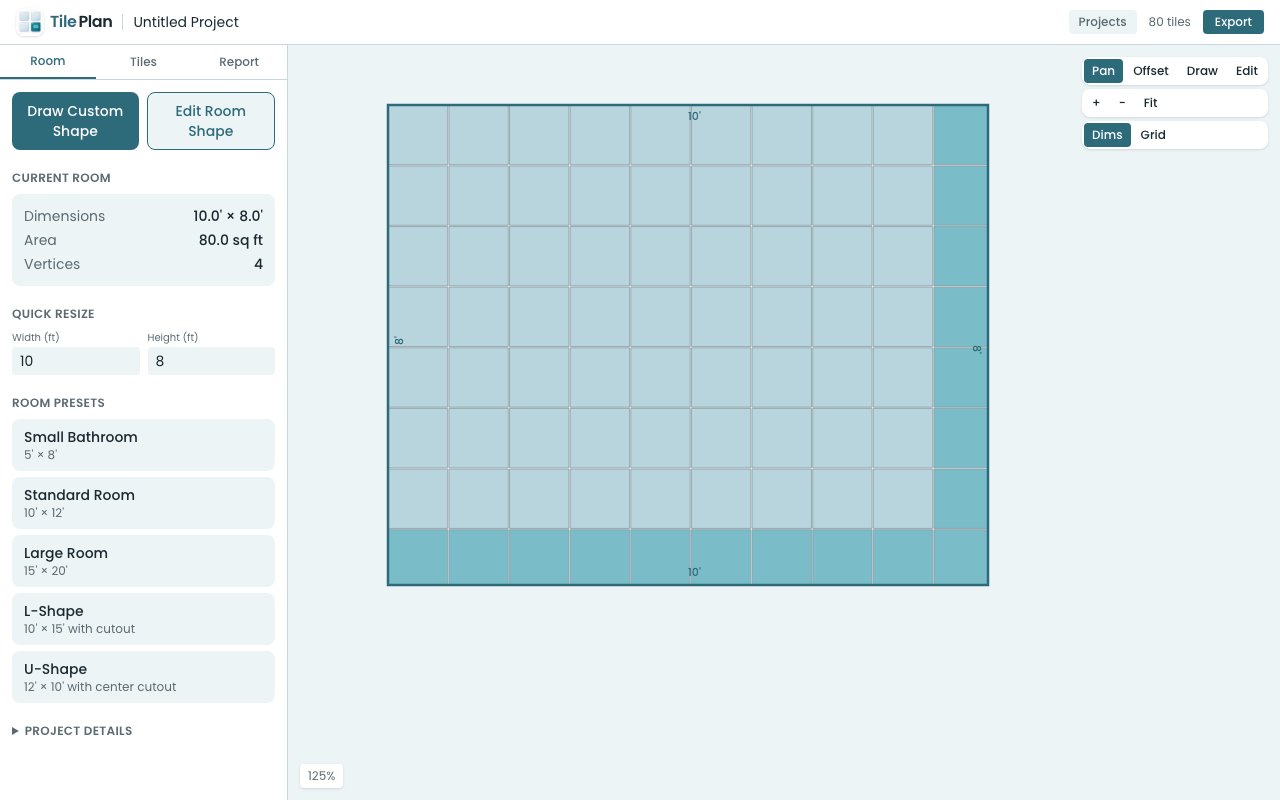
Start with a preset (rectangle, L-shape, U-shape) or draw a completely custom polygon. Click to place vertices, drag to adjust, and the app validates your shape in real time.
Configure Your Tile
Choose from square, rectangular, or hexagonal tiles. Pick a preset size (like 3×6" subway or 12×24" large format) or enter custom dimensions. Set your grout gap from 1/16" up to 1/2".
Choose a Laying Pattern
See how your tiles look in straight stack, running bond (half or third offset), diagonal, or herringbone (90° and 45°) patterns. The app shows which patterns work with your tile shape and flags incompatibilities.
See Every Tile Placement
The layout view renders every single tile — full tiles and cuts — clipped precisely to your room boundary. Zoom in to inspect edge conditions, or zoom out to see the full picture. Drag the pattern offset to center your layout or balance edge cuts.
Get Your Material Count
The report tells you exactly how many full tiles and cut tiles you need, with an adjustable waste factor. Enter your tile price to get a cost estimate with optional labor rates.
Export Your Plan
Download a PDF report, a PNG image of your layout, or a CSV cut list. Bring it to the store or share it with your contractor.
How It Compares to Native Apps
The web app uses the same layout engine as TilePlan's iOS app. The tile clipping, pattern generation, and cut analysis algorithms are identical. You get the same accuracy whether you're on an iPhone or a desktop browser.
The iOS app adds LiDAR room scanning and offline access. The web app adds instant access from any device with no installation.
Try It Now
Open app.tileplan.app and start planning. No account, no sign-up, no download. Your projects save automatically in your browser so you can come back to them anytime.
Plan Your Tile Layout with TilePlan
Calculate materials, visualize patterns, and get accurate cut lists for any room shape.
Download Free on the App Store